

You do not need Customer.io Premium to run a lifecycle email system that converts trials and saves churning accounts. Premium lists at $1,000 a month, 10x the $100 Essentials plan, and most bootstrapped SaaS teams get pushed onto it for one feature (managed deliverability, a dedicated IP, a data warehouse sync), not because they send too much. The six emails that move MRR (welcome, activation nudge, trial-ending, dunning, re-engagement, win-back) run fine on Essentials-tier tooling or a flat-rate platform, if you own the sending discipline that makes email land.
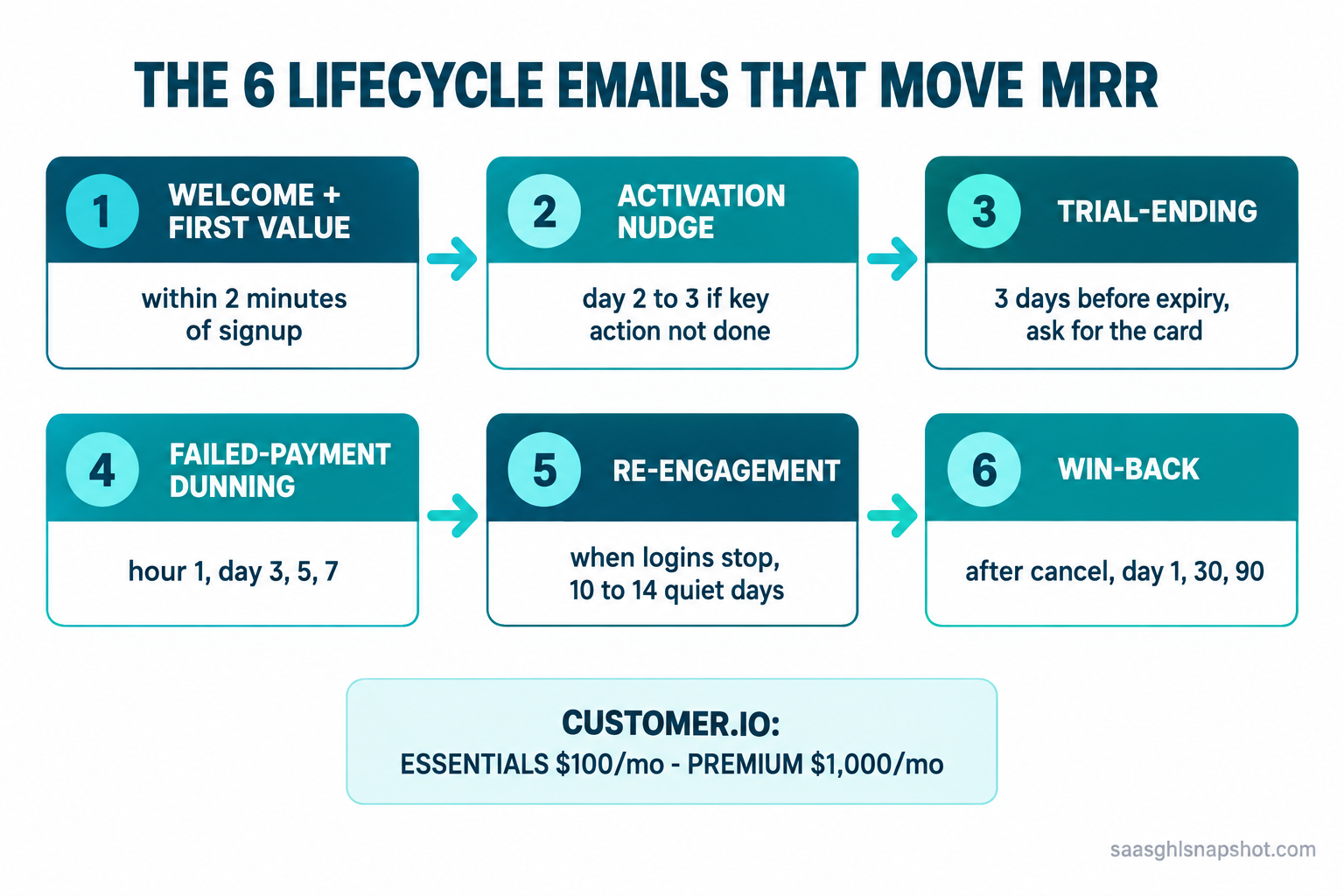
Table of contents
- The short answer
- What Customer.io actually costs
- The six-email system, mapped
- Stage 1: Welcome and first value
- Stage 2: The activation nudge
- Stage 3: Trial-ending conversion
- Stage 4: Failed-payment dunning
- Stage 5: Re-engagement when logins stop
- Stage 6: Win-back after cancel
- Three cost scenarios
- Deliverability rules you cannot skip
- Objections
- FAQ
- Sources
The short answer: you are buying a feature, not volume
Customer.io is a good product. The problem is the jump from Essentials at $100 a month to Premium at $1,000, a 10x step whose trigger for most small teams is not send volume. It is one Premium-only capability: managed deliverability, a dedicated sending IP, HIPAA support, or a data warehouse sync (Customer.io pricing). You see the box you need in the Premium column, and your email bill is suddenly bigger than your hosting.
So the honest question is not “Customer.io or a competitor,” it is which of the six lifecycle emails earn their keep and the cheapest way to send them well. The answer is usually one of three: stay on Essentials, move to a contact-based tool that includes what Premium charges for, or fold email into a flat-rate CRM.
What Customer.io actually costs
Customer.io prices on profiles, not seats. Essentials is $100 a month for up to 5,000 profiles and a million emails, and you pay $0.009 for each profile over the cap and $0.12 per 1,000 emails over it (Customer.io pricing, plan features). Premium starts at $1,000 and adds managed deliverability, a dedicated IP, and the data-warehouse sync. Enterprise pricing is not published; you book a call.
At 50,000 profiles you are still only halfway to the Premium price on Essentials. People who jump early are buying a feature, and features are solvable for far less.
The six-email system, mapped
Lifecycle email is a set of triggered messages tied to what a user does, or stops doing, inside your product. Six of them carry almost all the revenue impact for an early-stage B2B SaaS.
| # | Trigger | Timing | Job | |
|---|---|---|---|---|
| 1 | Welcome + first value | Trial signup | Within 2 minutes | Get to one real action |
| 2 | Activation nudge | Key action not done | Day 2 to 3 | Remove the blocker |
| 3 | Trial-ending | 3 days before expiry | T-minus 3, T-minus 1 | Ask for the card |
| 4 | Dunning | Payment fails | Hour 1, day 3, 5, 7 | Recover the charge |
| 5 | Re-engagement | Logins stop | 10 to 14 quiet days | Pull them back |
| 6 | Win-back | Subscription cancels | Day 1, 30, 90 | Earn the return |
Stage 1: Welcome and first value
The welcome email is not “thanks for signing up.” It is the shortest path to one real action inside your product, because a trial that never activates never converts. Fire it within two minutes.
How it breaks: the link points at your dashboard, not the specific action, and “go to your dashboard” is a dead end. Point at the exact screen. And never send it from noreply@: if you invite a reply, it has to reach a human.
Stage 2: The activation nudge
If the user did not complete the key action, nudge them once, specifically, about that action. A behavioral trigger beats a time-based drip: nudge only the people who have not connected an integration. Send it 24 to 48 hours after signup, only if the activation event has not fired.
How it breaks: the trigger is wrong, so activated users get the “you haven’t done it yet” email and think you are asleep at the wheel. Test the negative condition first. And nudge only once: a nag sequence gets you marked as spam, which wrecks deliverability for the emails that matter.
Stage 3: Trial-ending conversion
Most trials do not convert because nobody clearly asked for the card. The trial-ending sequence is two emails, a heads-up three days out and a last call one day out. If they added a card at signup (a card-required trial converts far better than a no-card one), this becomes a friendly “you’re about to be charged, here’s what you got done.”
How it breaks: the sequence fires on calendar date instead of the real trial-end date in your billing system, so people on extended or comped trials get “your trial ends tomorrow” mid-onboarding. Tie the trigger to the subscription state. It also breaks with no plan link; if converting means “log in, find billing, guess,” you lose the ones who were ready.
Stage 4: Failed-payment dunning
This is the highest-ROI email in the set, because the customer already wanted to pay; their card just expired or hit a limit. Involuntary churn from failed payments is a large slice of total churn, and a plain dunning sequence recovers a big chunk of it with no discounting. Build this one first. Retry and email at hour 1, day 3, day 5, and day 7, escalating gently from “heads up” to “your account pauses tomorrow.”
How it breaks: the retry logic and the email are not talking to each other, so someone updates their card, the charge succeeds, and they still get “your account is now paused” the next morning, the fastest way to lose a customer who was trying to pay you. Every dunning email must check current payment status before it sends. For the full build, see the SaaS dunning setup guide and the write-up on failed-payment dunning.
Stage 5: Re-engagement when logins stop
Customers usually stop using a product before they cancel it, so the login that quietly does not happen is your earliest churn signal, earlier than any survey. A re-engagement email tied to a usage drop catches accounts while there is still a relationship to save, so trigger it after 10 to 14 days with no login.
How it breaks: you do not actually track logins or a real usage event, so the trigger fires on the wrong people or never fires. You need one clean “active” event flowing into whatever sends the email. The second failure: treating a quiet power user (who uses your API but never opens the web app) as churning, so base “active” on real value, not just web logins. Turning that signal into a save is covered in churn prediction with health scores.
Stage 6: Win-back after cancel
A cancel is the start of the win-back clock, not the end of the relationship. People leave over budget, a missing feature, or timing, and all three change. A light three-touch win-back over 90 days recovers a slice of churned revenue for the cost of three emails: day 1 exit note, day 30 what changed, day 90 a reason to return.
How it breaks: you keep emailing people who asked to be left alone, which is both a CAN-SPAM problem and a reputation one, so honor unsubscribes instantly. It also breaks when the day-30 email is generic; name a real change or it reads as a discount grab. The wider recovery playbook lives in SaaS win-back campaigns.
Affiliate disclosure: the link above is a GoHighLevel affiliate link. We may earn a commission at no extra cost to you.
Three cost scenarios: solo, five-person, fifteen-person
The right tool depends on stage. Treat every price as published list pricing and confirm it on the vendor page before you buy.
Solo founder, pre-revenue to under $1M ARR
You have a few hundred to a couple thousand contacts and you are the whole go-to-market team. Customer.io Essentials at $100 works but is often overkill here. Loops starts free up to 1,000 contacts and is $49 a month at 5,000, with unlimited sends and a journey builder built for SaaS. If you want to own the logic, Resend sends your triggered emails for $20 a month up to 50,000. Either way you run the full six-email system for under $50 a month.
Five-person team, around $1M ARR
Now you have real volume, a support inbox, and maybe 5,000 to 15,000 contacts. The wall shows up here: you want a dedicated sending domain, see it in Premium, and stare at a $1,000 bill. Here is that stack priced across the field at roughly 10,000 contacts.
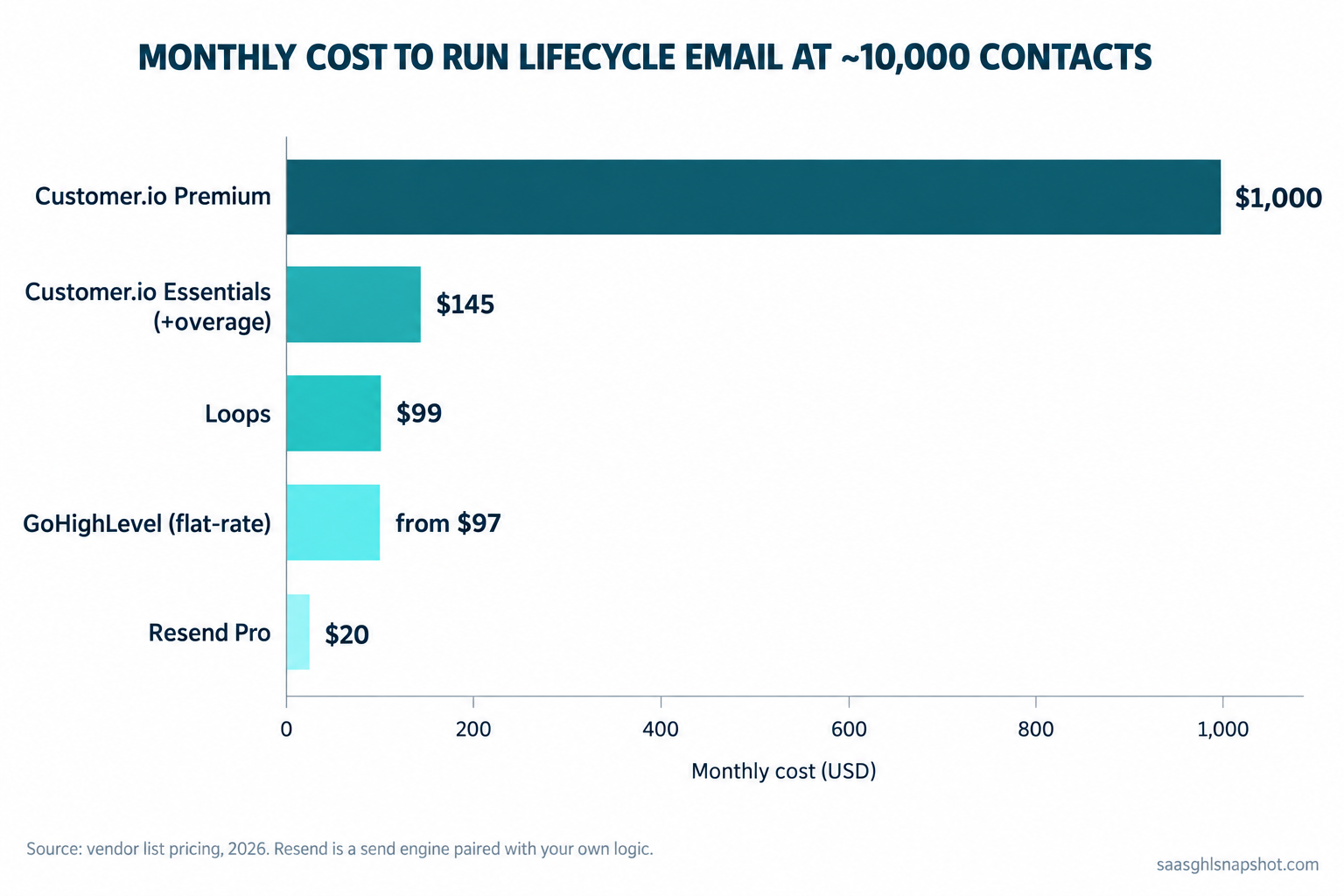
The spread is roughly 10x top to bottom. Essentials with overage is about $145 at 10,000 profiles, Loops is $99 with unlimited sends, and a flat-rate platform folds email into the CRM you already pay for. Premium is the outlier.
Fifteen-person team, $1M to $3M ARR
At this size you may genuinely want managed deliverability, a data-warehouse sync, and role-based access, which is a fair reason to pay for Premium. But price the alternative first: a dedicated IP and a warehouse pipe can be assembled from a send engine like Postmark (from $15 a month for 10,000 emails) plus your existing data stack, often for a few hundred a month all-in. And if your lifecycle email lives inside a flat-rate CRM, this is where consolidation pays for itself. The mechanics are the same as migrating off HubSpot.
The deliverability rules you cannot skip
Teams pay for “managed deliverability” because email is easy to send and hard to land. Run lifecycle email yourself and you own the rules that keep you in the inbox, and since 1 February 2024 those rules have teeth.
Google and Yahoo now require any sender pushing 5,000 or more messages a day to Gmail or Yahoo to authenticate with SPF, DKIM, and DMARC, keep the spam-complaint rate below 0.10% (and never let it reach 0.30% or higher), and support one-click unsubscribe via the List-Unsubscribe and List-Unsubscribe-Post headers (Google email sender guidelines, Yahoo sender requirements). Miss them and your mail gets throttled or bounced, which quietly kills every sequence above.
Two legal lines matter for a US B2B SaaS. CAN-SPAM governs all commercial email: accurate headers, a real physical address, and a working unsubscribe you process within ten business days. And the moment an EU trial signup lands, GDPR applies. None of this needs a $1,000 plan. The full walk-through is in the TCPA and CAN-SPAM guide for SaaS lifecycle messaging.
Objections
“Isn’t Customer.io Premium just worth it?” Sometimes. If you truly need HIPAA support, a dedicated IP, or a native warehouse sync your data team will use, Premium can be right at $1,000. The mistake is upgrading on reflex because a feature you want lives in that column, when a $99 tool or a $15 send engine covers it. Price the feature you are buying, not the whole tier.
“Won’t running my own lifecycle email hurt deliverability?” Only if you skip the checklist above. Managed deliverability just does the authentication, warm-up, and monitoring for you, and you can do the same with SPF, DKIM, DMARC, gradual domain warm-up, and clean lists. A send engine like Postmark or Resend handles the hard infrastructure; you handle the hygiene.
“Do I need to be technical to set this up?” For Loops or a flat-rate platform, no: you build the six sequences in a visual editor and connect a trigger. For Resend or Postmark, yes, because you fire the triggers from your own code, the tradeoff for the lowest price. Our honest comparison versus Customer.io lays out where each approach wins.
Frequently asked questions
How much does Customer.io cost in 2026?
Customer.io Essentials is $100 a month for up to 5,000 profiles and a million emails, with overage at $0.009 per extra profile and $0.12 per 1,000 extra emails. Premium starts at $1,000 a month and adds managed deliverability, a dedicated IP, HIPAA support, and a data warehouse sync. Enterprise pricing is not published. The 10x jump is usually triggered by a single feature, not by send volume.
What is a cheaper alternative to Customer.io Premium for lifecycle email?
Loops starts free up to 1,000 contacts and is $49 a month at 5,000 and $99 at 10,000, with unlimited sends. Resend sends triggered email from $20 a month for 50,000 emails if you wire triggers from your own app. Postmark starts at $15 a month for 10,000 emails and is built around deliverability. A flat-rate platform like GoHighLevel folds lifecycle email into the CRM for one price with no per-profile bill.
Which lifecycle emails should a SaaS build first?
Build the six that move MRR, in this order: failed-payment dunning first (the customer already wants to pay), then the trial-ending pair, then the welcome and activation nudge, then re-engagement on a usage drop, then win-back after a cancel. Dunning is highest-ROI because it recovers revenue with no discounting and no acquisition cost.
Do I need managed deliverability to run my own SaaS email?
No. Managed deliverability is a paid service that authenticates your domain, warms it up, and monitors reputation for you. You can do the same with SPF, DKIM, and DMARC records, a gradually warmed sending subdomain, clean lists, one-click unsubscribe, and a spam-complaint rate below 0.10%. A send engine like Postmark or Resend handles the infrastructure while you handle the hygiene.
What are the Google and Yahoo bulk sender rules for 2026?
Since 1 February 2024, any sender of 5,000 or more messages a day to Gmail or Yahoo must authenticate with SPF, DKIM, and DMARC, keep the spam-complaint rate below 0.10% (and never at or above 0.30%), and support one-click unsubscribe via the List-Unsubscribe and List-Unsubscribe-Post headers. Missing these gets your mail throttled or bounced.
Sources
- Customer.io pricing and plan features
- Loops pricing, Resend pricing, Postmark pricing
- Google email sender guidelines (bulk-sender rules)
- Yahoo sender best practices
Want the whole lifecycle email system wired to your product without the per-profile bill? Get the SaaS Snapshot or book a walkthrough. Related: SaaS lifecycle marketing, the trial-to-paid activation sequence, and the real cost of your GTM stack.